
Explore Our Brand New Website! More courses, better navigation, and everything you need. | 📋 Microsoft Certification Roadmap

HTX Cloud Digital Skilling

Welcome to the HTX Digital Skilling Program in partnership with Microsoft and NetAssist.

You can find information about all Microsoft Azure training and certification programs available to all HTX staff here. You can also enroll in all published courses directly from this site. Alternatively, if you would like to request for a dedicated class for your team, you can also submit a request directly from this site.


HTX powered by NetAssist

Value Added Training Programs

Intro to Cloud Computing & Azure Training

Register and attend for FREE Azure Fundamentals virtual instructor-led classes by NetAssist.

Free Exam Prep Clinics

Get a head start for your certification exam. Register and attend free exam preparation clinics by NetAssist.

Dedicated, Contextualized Training Classes

Speak with your NetAssist Program representative and arrange for dedicated training sessions contextualized for your team.

Microsoft Azure Learning Path

Cloud Certification Journey
Azure Fundamentals
AZ-900
Azure Administrator
AZ-104
Security
AZ-500
Network
AZ-700
Architect
AZ-305
DevOps
AZ-400

Start with Fundamentals → Advance to Administrator → Choose your Expert specialization

FAQ

Course Related

Courses listed are fully paid for all Xponents. For the full catalogue of courses available for booking, please visit https://go.gov.sg/htx-digitalskilling.

All classes will be held in person unless otherwise specified. The training coordinator will email you two weeks prior to the start of your class. If you do not receive a confirmation, please reach out to joey@netassist.com.sg.

Please email joey@netassist.com.sg for private class requests.

We recommend PCs/laptops that have no restrictions (some corporate-issued machines have issues accessing certain sites or doing lab work), and a secondary screen for the best virtual class experience.

Microsoft Teams App is useful but not necessary. Please ensure you can view the Teams chat during the class either via Teams web browser or Teams apps.

Microsoft ESI Related
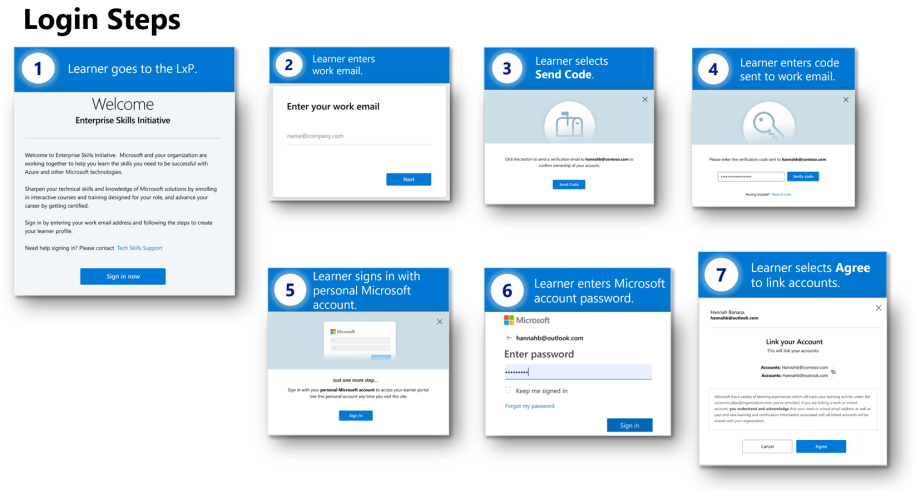
Step 1: Go to LxP

Step 2: Enter work email. (Please use @htx.gov.sg email for LxP login. Do not use @hometeamsnt.onmicrosoft.com)

Step 3: Select “Send Code

Step 4: Enter code sent to work email

Step 5: Sign in with a personal Microsoft account (e.g: hotmail.com, outlook.com, etc)

Step 6: Enter your Microsoft account password

Step 7: Select “Agree” to link accounts

Need help signing in? Please contact: ESI Support

Please verify your log-in credentials. The initial log-in prompt requires your work email (@XXX.gov.sg) and password, while the second prompt uses your personal email (Hotmail/Outlook/Gmail, etc) and does not require a password.
SPF staff should access LxP using their work laptop.

Exam Related

Step 1: Log in to Microsoft ESI Learner Experience Portal (LxP)
Step 2: Go to the “Microsoft Certifications” and click "Schedule".
Step 3: Choose your desired exam and it will bring you to the Pearson VUE site.
Step 4: Sign in with your Microsoft account (personal email) for your Microsoft certification. If you do not have an account, click “Create New” to create one Microsoft account.
Step 5: On the Exam Discounts page, validate your work email to check your eligibility and link your personal account with your work account to enjoy the ESI exam discount (50%)
Step 6: Click “Claim” to enjoy the 50% discount before scheduling an exam.


For step-by-step guidance, check out the ESI exam discount video.

When creating the Pearson VUE certification profile, do not include the "," in the Legal name field even though it is in your NRIC. If you have included the "," in the field and cannot remove it, you can either create a new Microsoft Certification profile or you'll need to submit a change request using the Microsoft Certification Profile Name Change Request Form. Please allow 48 hours for the change to take effect.

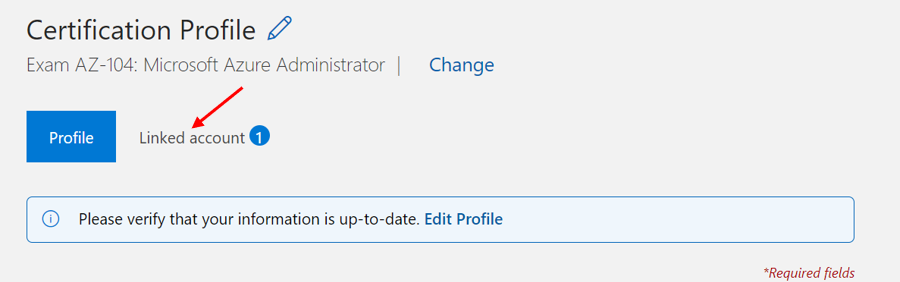
Log in to your Certification Profile to unlink your account with your previous work email.
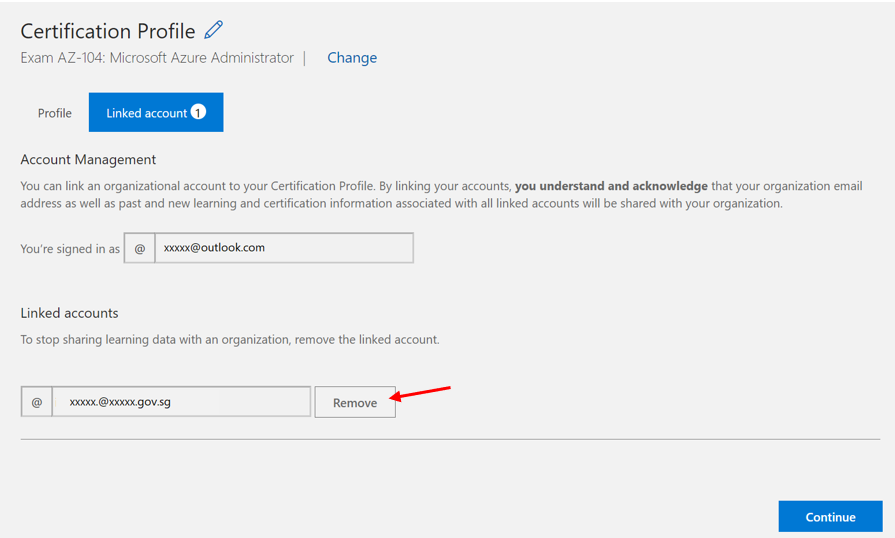
Now, you can link your account with your current work email to validate the eligibility.

GoCloud is offering a limited Azure Exam Voucher Program where you can apply for exam voucher for your Azure certification. Register your interest here: https://forms.office.com/r/YSu4fPVWLc.

Please contact joey@netassist.com.sg if there are any issues.

1. Log into your Microsoft learn profile and choose "Profile".
2. Select Certifications in the profile menu.
3. You will be redirected to the exam delivery provider’s site to cancel or reschedule your exam.
4. For step by step details on how to reschedule or cancel your exam appointment, please see exam reschedule and cancellation policy.

Get Certified. Be Recognized

Certification Matters

Increased quality and value of work contributions
70 %
Increased efficiency (produce more in lesser time)
65 %
Increased ability to innovate work processes and outcomes
50 %
Go to go.gov.sg/htx-digitalskilling
Explore Microsoft Cloud Skilling Roadmap
Check published class schedules and register for training
Attend training and exam prep
Take exam and be certified
Update your certifications and #surfaceyourcreds